·
(Browser link works more reliably — the TTB mobile site can be glitchy)
Claim now →
Browser
Army Stack Calculator
Calculate optimal troop distribution for your army
How to find the correct Health Bonus
Quick method (easy)
Set up an attack and open the Start March menu.
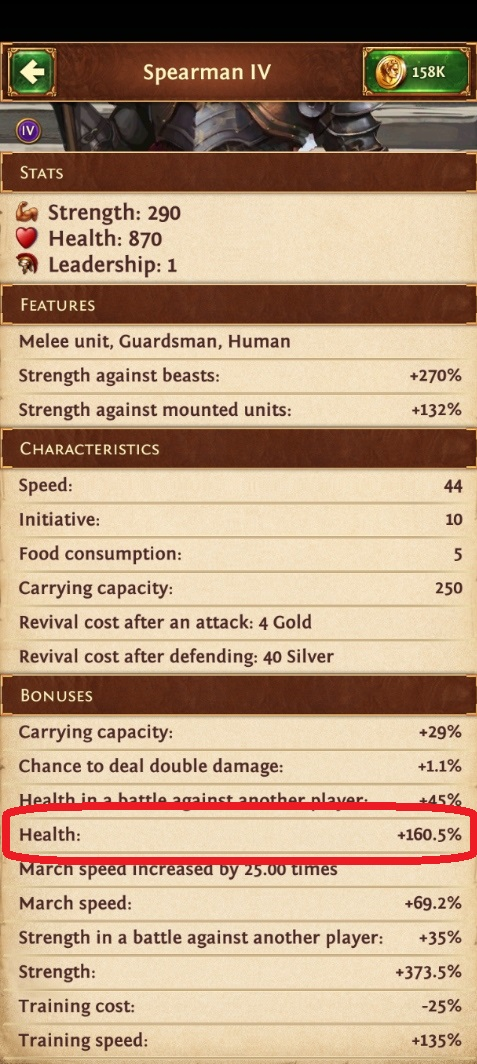
Tap the portrait of the troop you want to check (e.g. Spearman G4).
Scroll to the Bonuses section and read the Health value.
This value includes bonuses from all currently active captains and your Hero. Since most targets only allow a limited number of captains per march, this value will almost always be too high and should only be used as a rough estimate.
Precise method (recommended)
Send a real attack with your intended setup — ideally all troop types active, 1 unit each is enough.
Use the exact captains, Hero, artefact, equipment and premium you plan to use.
Open your Journal → Battle Report, tap the troop/stack and scroll down to the Health bonus.
This gives you the exact bonus that applied during the battle — fully accurate.
Enter the value exactly as shown in-game — e.g. 160.5 for a +160.5% bonus.
Simple: Distributes leadership using the doubling rule — each lower tier gets 2× more units than the tier above. Fast and works well without health bonus data.
Advanced: Calculates units based on actual effective health (base health × bonus). All troops within the same tier get equal total effective health. Each higher tier gets 3% less health than the tier below — ensuring lower tiers always die first while keeping the distribution close to equal.
Input Values
Select Troops
Guardsmen
Specialists
Monsters
Mercenaries
No troops defined for this category yet.
Results
Select troops and click "Calculate Stacks" to see results